ZINDRYX Download

For JAMB and WAEC students

Study together, not alone.

Zindryx is a study app where you practise exams in real time with other students, ask an AI built for studying, and chat in a space designed to keep you safe.

1,000+practice questions
JAMB & WAECexam coverage
Works offlinedownload questions
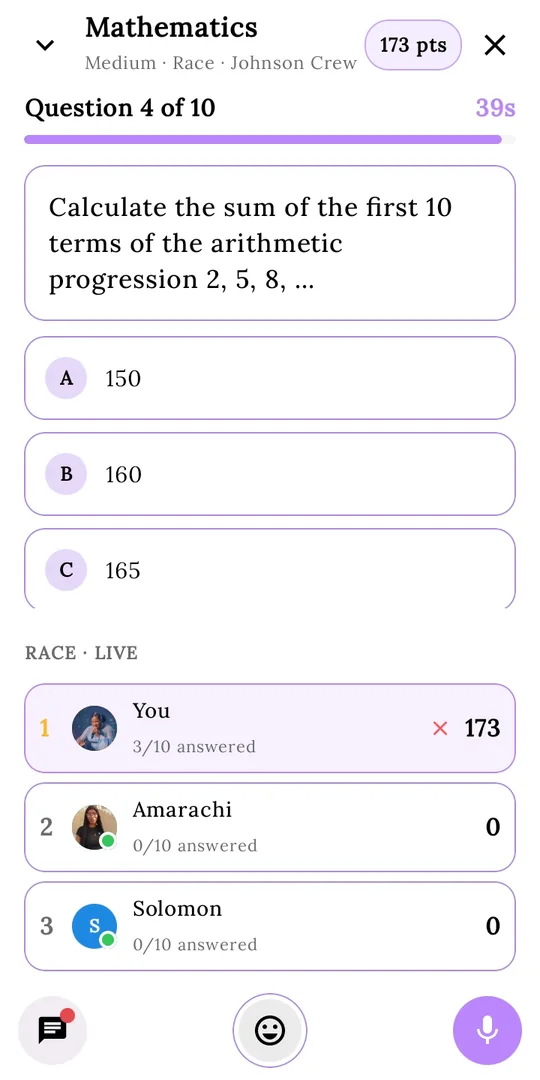
Zindryx synced exam in progress: Mathematics question 4 of 10 with a live race scoreboard showing three students

Practice with friends. See who's ahead.

What's new

Latest updates

Current app version: 1.1.6. Every version is listed on the download page.

Version 1.1.6

Current build
  • Invite links. Groups are now joined by invite link. Admins set an expiry and choose whether new members can see earlier messages. Admins can revoke a link at any time.
  • Locked groups. Turn on a lock and new people wait for admin approval before joining.
  • Privacy controls. Choose who can add you to groups and who can call you. You can set either to nobody.
  • Change log notes: detailed notes for this version are coming soon.
Invite links

How invite links work

To join a group on Zindryx you need an invite link. An invite link looks like linking.chadivavirtuals.name.ng/?code=abc1234. The code is 7 letters or numbers. Opening the link on a phone with Zindryx installed opens the app and shows the group with a Join button. Without the app, the website handles it.

What a link shares

Before joining, you only see the group's name, photo and member count. Never message content.

What admins control

The expiry (up to 7 days by default), whether new members see earlier messages, and revoking the link early.

If a link doesn't work

No code detected: the link had no code. Invalid code: no invite with that code exists, so check for a typo. Expired: it passed its expiry date. Revoked: the admin cancelled it. For the last two, ask the admin for a new link.

Same idea for calls

You decide who can add you to groups and who can call you. Set it to nobody and no one can add you without your consent.

Our story

Built by one developer. Grown by a small team.

Hxf Hub started with one person: Ifeanyi David Onyeka, also known as Holixdave Hxf. The studio carries his name, and he built the first version alone. As the app grew, a small team formed around it to keep up.

Zindryx was first made for JAMB students. It has since grown to cover secondary school standard education, with JAMB and WAEC practice.

Why "Zindryx"? We searched around online for a name and couldn't find anything matching that word. So it was ours. We tied it to a meaning: Genesis, a beginning.

Students in higher institutions: Learning content on Zindryx is built for JAMB and WAEC, so we can't promise it for your courses. The platform parts, like chat and calls, are open to you as a study-focused space.

The spark

Studying alone is hard. Answering past questions alone is harder. Students who prepare by themselves can feel left behind.

A solo build

Hxf Hub began as a one-developer project, shaped by what students actually needed to prepare for their exams.

Practise together

The answer was a synced exam system: many students, one practice room, the same questions, in real time.

OOOR joins

An AI built far beyond exam schemes arrived to explain, teach and keep your notes.

Safer by design

Chats, groups and calls got privacy controls and protection against spam and fraud.

A growing team

A small team now builds Zindryx together, and we're still growing.

Features

Everything you need to prepare

Three big ideas sit at the centre of Zindryx. Around them are the tools that make studying easier.

Pillar 1

Synced CBT exams

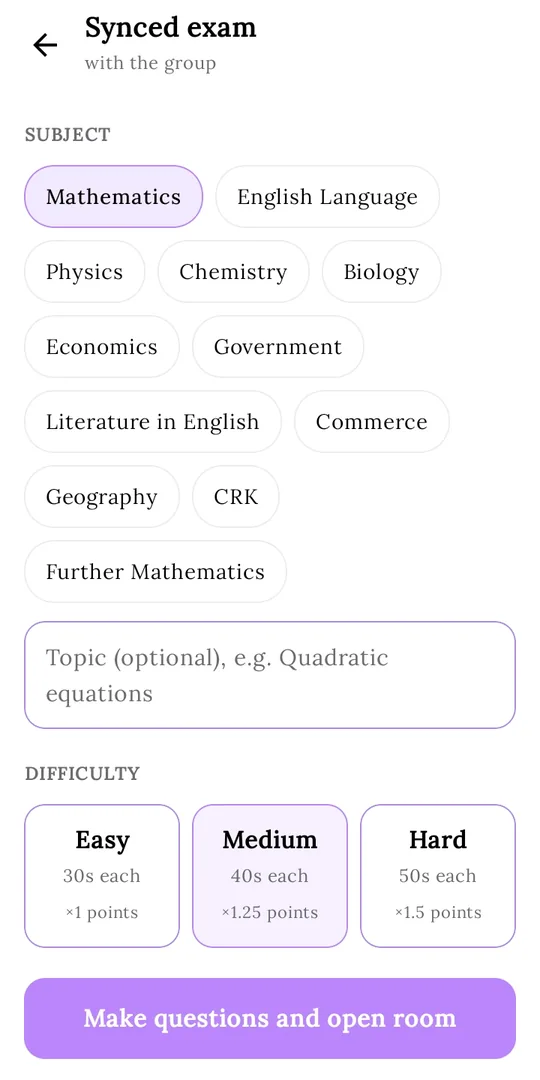
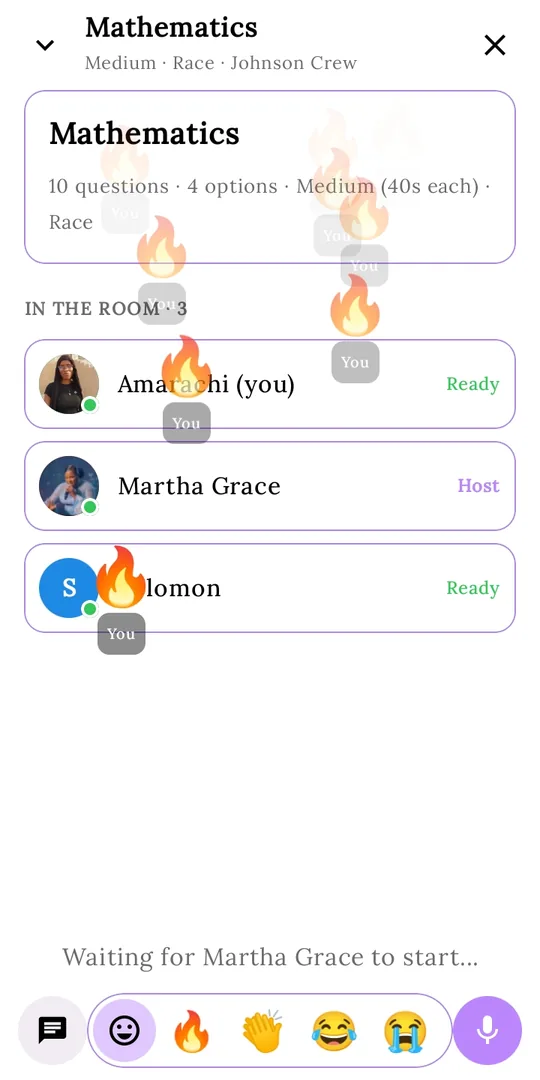
Studying and answering questions alone can leave you behind. So Zindryx has a synced exam system: several students practise the same questions together, in real time, in one practice room.

  • Start one from any group chat. Pick the subject, difficulty, number of questions and how it plays. OOOR makes fresh questions for every session
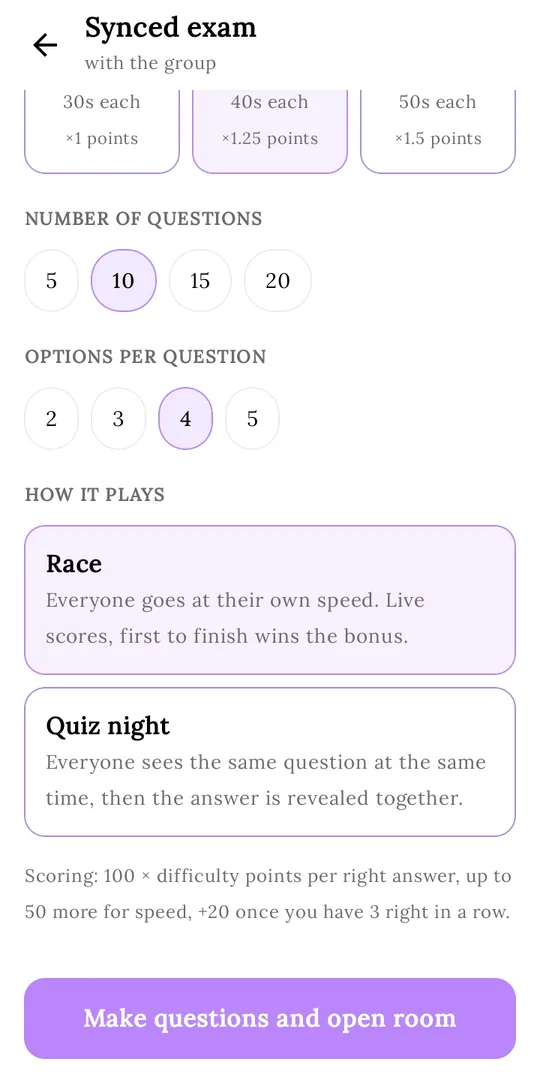
  • Two ways to play: Race (everyone goes at their own speed with live scores, and the first to finish gets a bonus) or Quiz night (everyone sees the same question at the same time, then the answer is revealed together)
  • Chat, send voice notes and fire off reactions while you practise
  • Fair scoring: 100 points × difficulty per right answer, up to 50 more for speed, and +20 once you get 3 right in a row
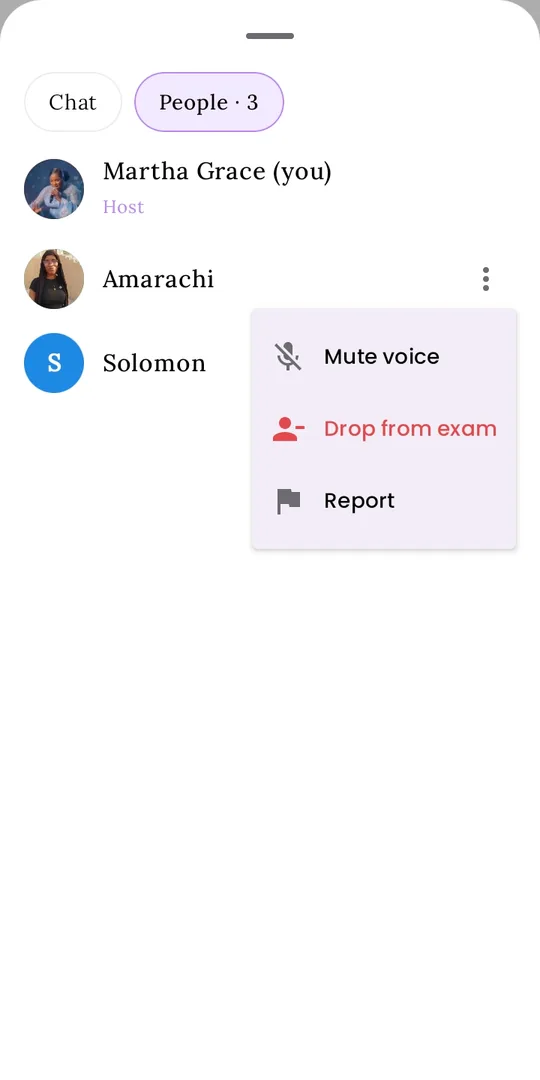
  • The host can mute voice, drop someone from the exam or report them
Zindryx synced exam waiting room with fire emoji reactions flying across the screen

A synced exam, step by step

Swipe to see the whole journey.

Synced exam setup screen with a list of subjects, optional topic and difficulty
1Pick a subjectChoose from 12 subjects, add an optional topic, then set the difficulty.
Synced exam setup screen with number of questions, options per question and Race or Quiz night modes
2Set how it plays5 to 20 questions, 2 to 5 options, Race or Quiz night. Then OOOR makes the questions and opens the room.
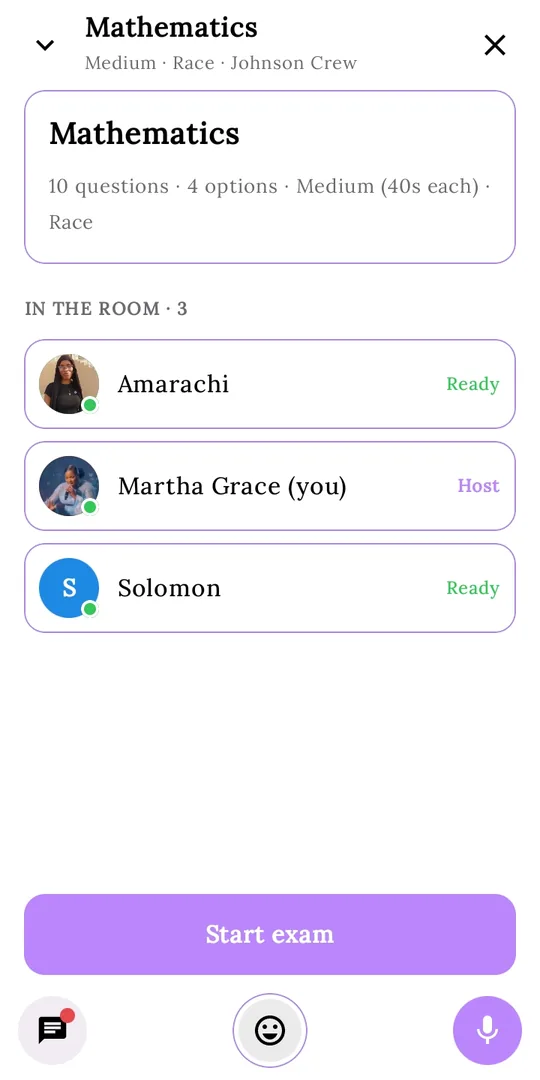
Synced exam lobby listing three students who are ready, with a Start exam button for the host
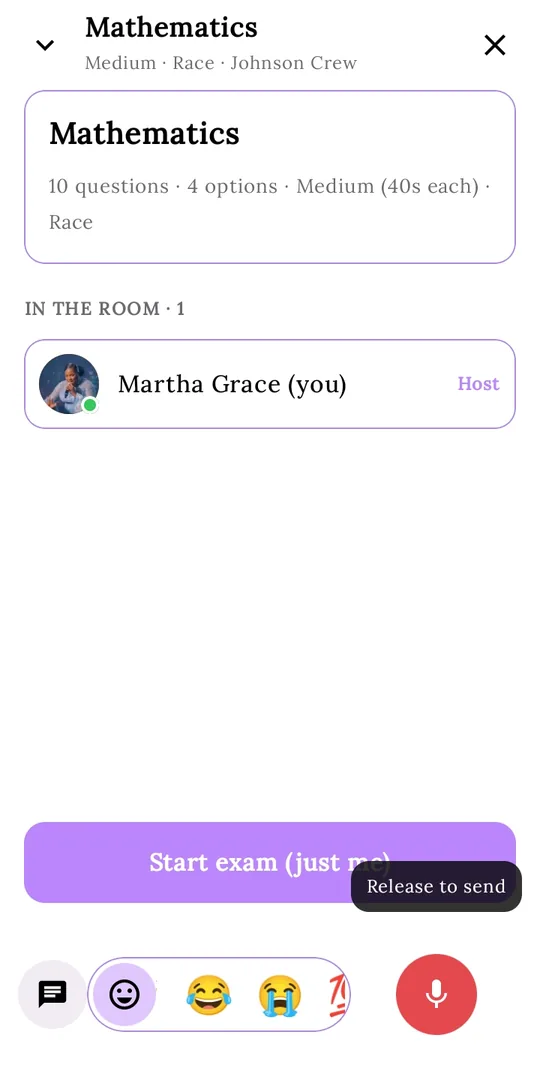
3Gather in the lobbySee who is in the room and who is ready. The host starts the exam.
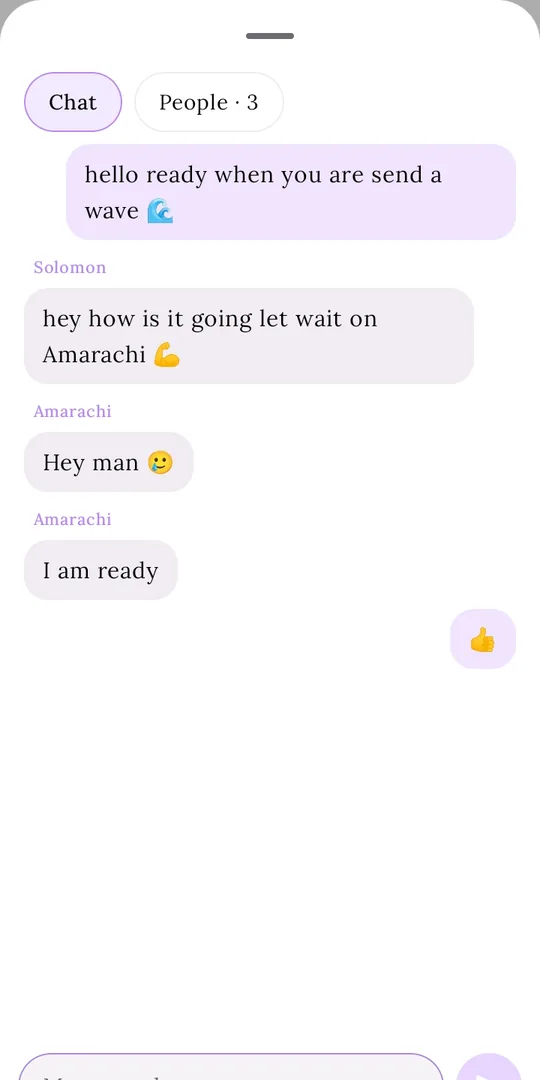
Synced exam room chat where students say they are ready and one sends a thumbs up
4Chat while you waitSay hello, send a thumbs up, and warm up together.
Recording a voice note in the synced exam room with a Release to send prompt
5Hold to send a voice notePress the mic, talk, and release to send. No typing needed.
Live race scoreboard during a synced exam showing each student score and answers so far
6Race liveA timer on every question and a live scoreboard of who is ahead.
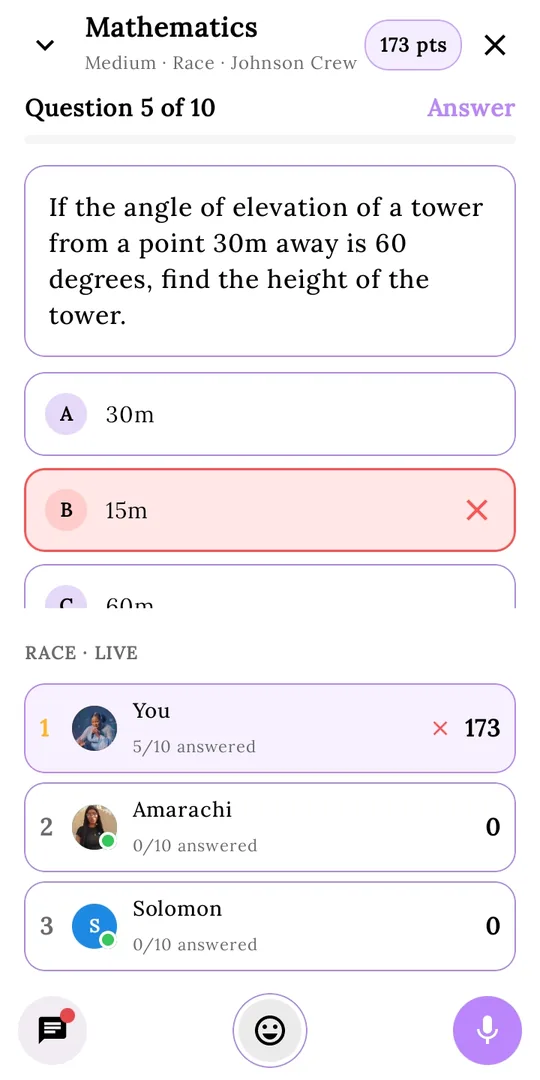
A wrong answer highlighted in red during a synced exam question
7Instant feedbackRight and wrong answers show straight away, so you learn as you go.
People tab in a synced exam showing host controls: mute voice, drop from exam and report
8Stay in controlThe host can mute voice, drop someone from the exam, or report them.

Pillar 2

OOOR: Out Of Ordinary Response

OOOR isn't one model. It combines several large language models working together to give you the best result in the most efficient way. It goes far beyond exam schemes.

  • Ask anything and get clear explanations
  • Needed a formula? Ask OOOR to save it to your notebook
  • Ask OOOR to edit an existing note for you
  • Built into the app, so it's there while you study
O
OOOR
Save the quadratic formula to my notebook
Done. Here it is: x = (−b ± √(b² − 4ac)) / 2a
✓ Saved to notebook
Add a worked example to that note
Updated your note with an example for 2x² + 3x − 2 = 0.

Pillar 3

Chat that respects you

Chat works the way real-time messaging apps do, with privacy built in. You decide who can reach you.

  • Strangers have to send a request first
  • Until you accept, a non-friend can send no more than two messages
  • A report button is always one tap away for suspicious behaviour
  • Real-time in-app support to answer students' questions
N
New message request
Nkem wants to chat

They can send up to 2 messages until you accept.

AcceptDeclineReport
Hi! Saw you in the English room 👋
Want to practise together?
2 messages max until you accept

And more

Offline mode

Download questions ahead of time to save data, then practise on the go with no internet.

Study notes

Keep a notebook of formulas and key points. OOOR can save to it and edit your notes for you.

Leaderboard

Share your interactions and see your current stage on the leaderboard.

Calls

Group and private calls, alongside your chats. You choose who is allowed to call you.

In-app browser

Browse the internet through the Hxf in-app browser without leaving the app.

Hub

Real information on exam dates and more. Share your thoughts and stay informed.

Group tools

From inside any group, start a synced exam, ask the AI, send a short clip or start a video chat.

Novel summaries

Read exam summaries of the novel so the story is clear before the exam.

Safety and privacy

A study space you can trust

Students should be able to chat without being spammed, scammed or added to places they never agreed to. Here's how Zindryx protects you.

You control who gets to you

  • Add-to-group control. In Profile and privacy settings, choose who can add you to groups. Pick nobody and you can't be added without consent.
  • Invite links. Groups need an invite link to join. Calls follow the same idea: you choose who can call you.
  • Message requests. Non-friends must send a request and can send only two messages until you accept.
  • Report button. Easy to reach whenever someone acts suspiciously.
Privacy
Who can add me to groups
Nobody
Who can call me
Friends
Message requests

Tools for group admins

  • Block links and phone or account numbers. Members can still chat. Only links and numbers are stopped.
  • Admin-only mode. Only admins can send messages in the group.
  • Lock the group. New join requests wait for admin approval.
  • Add by admin only. Only admins can add members.
Group settings
Block links
Block phone & account numbers
Only admins can send
Lock group (approve joins)
Only admins can add

Shadow-ban service

If an account keeps acting fraudulently and gets reported several times, it is blocked. Their messages are then visible only to themselves. No one else sees them. The block stays until our server unblocks the account.

Real-time support

Questions about the app? Our team answers students inside the app, in real time.

See it work

Interactive demos

Drag the bar below, swipe, or hold Shift and scroll to move between demos.

FAQ

Questions people ask

Which exams is Zindryx for?

JAMB and WAEC. It started for JAMB students and now covers secondary school standard education. It is not for Post-UTME.

Which subjects can I practise in a synced exam?

Mathematics, English Language, Physics, Chemistry, Biology, Economics, Government, Literature in English, Commerce, Geography, CRK and Further Mathematics. You can also add an optional topic, like quadratic equations.

I'm in a higher institution. Can I use it?

You can use the platform areas, like chat and calls, as a study-focused space. We don't guarantee learning content for higher-institution courses.

Is Zindryx on the Play Store?

Not yet. For now you can download the app directly from the download page, where every version is listed.

Can I practise without internet?

Yes. Download questions while you're online, then practise offline later. It also saves your data.

What does an invite link share?

Only the group's name, photo and member count are shown before joining. Never message content.

Can a link be cancelled early?

Yes. The group admin can revoke a link at any time from group info, even before it expires.

My code says "invalid", "expired" or "revoked".

Invalid: no invite with that code exists, so check for a typo. Expired: it passed its expiry date. Revoked: the admin cancelled it. For expired or revoked links, ask the group admin for a new one.

The site says "No code detected".

The link had no invite code. Paste your code on the home page, or ask the admin to send the link again.

Where is my data stored?

Messages and group data are stored on Google Firebase Firestore. Invite links are checked and joins are processed against Firestore's security rules. Read our Privacy Policy and Terms & Conditions for details.

What is OOOR?

OOOR stands for Out Of Ordinary Response. It combines several large language models working together to give the best result in the most efficient way.

Why am I seeing messages from a blocked person?

You aren't. Accounts blocked for fraud have their messages shown only to themselves. If you see someone behaving badly, use the report button.

Support

We're here to help

Email us

support@hxfhub.com
Our Zindryx team replies to account and login issues.

In the app

Use real-time in-app support to ask questions and get answers fast.

Ready to study together?

Download Zindryx and join a practice room today.

Opening in Zindryx…